A1: AI Coding Exercise
A1 continues the Wednesday studio. You left the studio with an AI-generated chat app at whatever stage you reached and, possibly, a partial diagram of its notification system. In A1, you will finish a focused diagram of that notification design, propose an alternative design, and make three requirement changes to the existing code. You will not implement the alternative design or finish and polish the whole chat app.
Building a system is often easier than changing it. A system's design affects how many parts must be updated when its requirements change. This assignment asks you to examine that relationship in a system you designed.
Submit on Gradescope by Sunday, August 30, 11:59 pm.
Getting Started
Start with the code your agent produced in the studio and any diagram or notes you completed there. Work only on the notification system: the code that creates, delivers, or suppresses notifications, plus its connections to messages, users, and channels. You do not need to document the rest of the app.
- If your app works, continue from that version.
- If it is incomplete or does not run, analyze the code you have. Do not repair unrelated features before beginning.
- If you missed the studio or have no code, use AI to generate only the notification logic from the shared specification. It may be headless; you do not need to build a complete chat interface.
Export the full AI transcript at the end of every working session, starting with the studio. See the transcript policy for formats and export instructions.
Diagram Format
Your diagrams may be informal. You do not need to use UML or another formal notation, and visual polish is not graded. You may draw by hand or use any digital tool.
A reader must be able to identify:
- the relevant components or responsibilities
- the connections between them, with short labels where the meaning is not clear
- where the system connects to messages, users, and channels
- the code module, class, or function for each component in the as-built design
- anything you could not determine, marked with a
?or another explained symbol
Here is one possible informal diagram of an unrelated library checkout system:
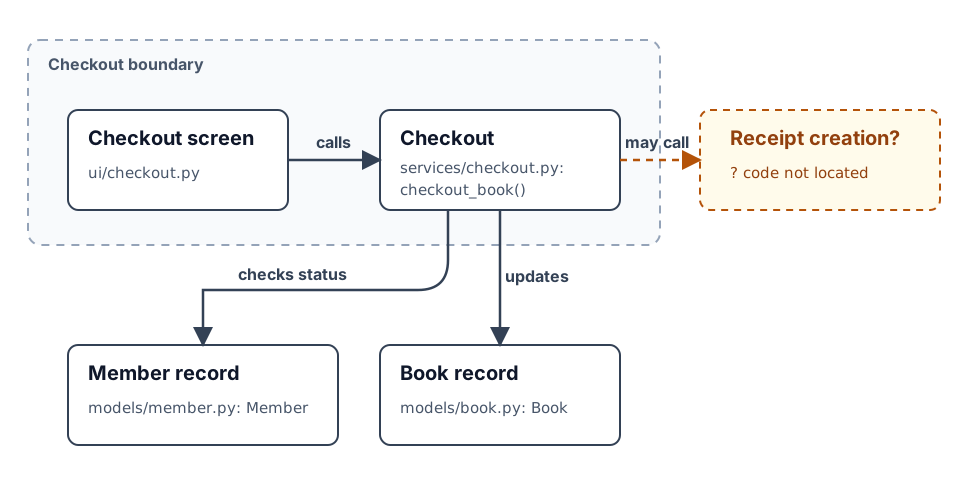
This example uses ordinary boxes, a system boundary, labeled connections, code identifiers, and a ? for an unresolved question.
A hand-drawn version could communicate the same evidence and receive the same credit.
A list of files or an unannotated code screenshot is not sufficient because it does not show how the parts connect.
Include a small legend if you use symbols that are not self-explanatory.
Evidence notes may appear on the diagram or immediately beside it.
Steps
-
Document the generated design: Finish or recreate an as-built diagram of the notification system in your studio code. Show the relevant components and the points where notifications connect to messages, users, and channels. Label each component with a corresponding module, class, or function from the code. Add no more than three short notes identifying important design decisions and the code evidence for each one. If you cannot resolve part of the design, mark the uncertainty on the diagram instead of documenting the whole app to find it. You may use AI to help trace the code, but verify its claims against the code yourself.
-
Create an alternative design: Draw an alternative design for the same notification system and boundary. Make at least one meaningful design decision differently from the generated system. Add no more than three short notes explaining what you changed, which quality the change improves, and what it costs or makes harder. You may discuss the redesign with AI, but the decisions and trade-offs must be your own. Label each proposed component by its responsibility; it does not need a code identifier because you will not implement this design. Do not implement this design.
-
Predict: Read the three requirement changes in Step 4. Before changing the code, predict how each requirement would affect both designs. For the generated design, name the specific components you expect each change to affect, including any outside the notification boundary. On the alternative design, mark where each requirement would land. Your predictions must be specific enough to compare with the result, but their accuracy is not graded.
-
Make the changes: Complete the following requirements in order with AI. Do not implement the alternative design first.
- Snooze: Mute a channel for one hour; it unmutes itself after the hour elapses.
- Scheduled messages: Compose a message now and deliver it at a chosen time. Mentions and unread counts update when the message is delivered, not when it is composed.
- Digest: Collect a user's non-urgent notifications and send them together in a periodic digest instead of sending a notification for every mention. Direct messages remain immediate.
For each change, record which parts of the system it affected, how many rounds of instructions the agent needed, where you intervened, and what made the work difficult. Do not submit only a list of changed files; the agent can produce that list from the code changes. Explain which parts required little or substantial effort and why.
-
Reflect: Answer the three questions below in one page total, written without AI. These questions also provide practice for explaining your technical decisions in an interview.
- What was hardest to determine about the generated notification design? What evidence helped you resolve it, or what remains uncertain?
- Which decision in your alternative design would most affect where the three changes land? What trade-off does that decision introduce?
- Which prediction differed most from what happened during the changes? What does that difference reveal about the generated system?
Support each answer with a specific item from your as-built diagram, alternative design, prediction, or change record.
Submission
Upload one zip file to Gradescope containing:
- your project code. You do not need to use a git repository for this assignment because you will submit a zip file. The group project will require version control.
- the as-built diagram and evidence notes from Step 1, as a PDF, PNG, JPEG, or clear photo or scan
- the alternative design and design notes from Step 2, as a PDF, PNG, JPEG, or clear photo or scan A multi-page PDF is acceptable.
- the prediction (Step 3) and change record (Step 4), in Markdown or plain text
- the one-page reflection (Step 5)
- a
transcripts/directory with one full transcript per working session, including the studio session
A submission without transcripts is incomplete. The late policy applies.
Grading
We grade your documentation and reasoning, not whether the studio app or the three changes work. Prediction accuracy is not graded.
| Component | Weight | Graded on |
|---|---|---|
| Generated-design documentation (Step 1) | 25% | A focused, code-grounded diagram of the notification system and its connections, including clearly marked uncertainties. |
| Alternative design (Step 2) | 25% | A meaningful alternative design, with a specific quality improvement and trade-off grounded in the generated design. |
| Prediction (Step 3) | 10% | A specific, checkable account of where each requirement would affect both designs; accuracy is not graded. |
| Change record (Step 4) | 20% | Specific evidence about the instructions, affected components, interventions, difficulty, and effort for each change; working code is not graded. |
| Reflection (Step 5) | 20% | Answers grounded in specific submitted evidence that explain the student's documentation, redesign, and change experience. |
| Transcripts | required | Ungraded, but the submission is incomplete without them. |